How do you stop a customer-facing AI agent from reading your financial data? It's one of the first worries teams raise when an agent moves from internal pilot to talking with customers.
The usual setup makes the worry real.
A bot gets wired up with someone's API key or login, so it sees everything that person sees: the help center, but also the finance folder, the HR channel and last quarter's board deck.
52% of organizations say their agents at least sometimes inherit access meant for humans, according to the Cloud Security Alliance.
The safer pattern is to give each agent its own identity and access level, connected through MCP, so it can only see and act on what it's allowed to.
That said, AI agent access control covers which identity each agent runs as, which sources it can reach, what it may do there, and how you test all of it before launch.
Key takeaways
- Give every agent its own identity. A customer-facing agent should never run on an employee's key or login.
- Start each agent at zero access, grant only the sources its job needs, and decide read and write separately.
- Permissions only protect what's out of scope. Anything in scope can leak, so keep a public agent's scope small and public-safe.
- Before launch, ask for a restricted doc as each identity and confirm it stays hidden.
What is AI agent access control?
AI agent access control is the set of identity, authorization and runtime rules that decide what an AI agent can read, reach and do on every request. Each agent runs as its own identity, scoped to its job, instead of borrowing an employee's login.
It covers two separate things: what the agent can see and what it can do.
An agent that can only search the help center carries a different risk from one that can edit docs or post in Slack, even when both reach the same sources.
Most teams can start with roles. Role-based access control (RBAC) works when you run a handful of agents with clear jobs.
Attribute-based access control (ABAC) helps once access depends on the customer or the record being read.
These checks live in the context layer between your agents and your sources, so every request passes through the same rules.
Why AI agents need different access controls than humans
AI agent permissions can't simply copy a person's, because human permissions assume a trusted person who uses judgment, while an agent acts at machine speed, follows instructions hidden in the content it reads, and can be reached by people nobody vetted. Reusing a person's permissions works for some internal assistants, but it breaks for agents that run on their own or talk to outsiders.
If an agent that talks to customers runs on an employee's access, anyone who can message it can reach every doc that employee can open. The agent can overshare by accident, which is one of the problems that can occur.
Another one, more dangerous, is that the agent also reads whatever customers send it. A malicious message can hide instructions that the agent then follows, which the agent can act on.
This type of malicious attack called prompt injection has been demonstrated in 2025 against a Supabase MCP.
A support ticket with hidden instructions got a developer's agent, connected with a privileged role, to read a private tokens table and paste it into a reply the customer could see. Every step was a read, so a read-only setting wouldn't have stopped it. A narrower scope would have.
How MCP access control works
MCP gives an AI agent one endpoint to reach a knowledge source. Over HTTP it uses OAuth 2.1: the client requests scopes, the server checks a token issued for it alone, and every call is limited by that token's scope and the identity behind it.
It gets asked whether this is "adding a back door into your data." It isn't, as long as the identity behind each connection is right.
MCP authorization in plain terms
Under the current spec (revision 2026-07-28), the MCP server acts as an OAuth resource server, tokens are bound to one specific server, and clients should request only the scopes they need.
Token passthrough, where a server forwards a token issued for something else, is forbidden. The spec also flags "treating claimed scopes in token as sufficient without server-side authorization logic" as a mistake. Scopes alone aren't enough, so the knowledge hub still checks its own permissions on every request.
Per-tool scopes aren't settled in the spec yet. Many MCP clients let you allow, require approval for, or block each tool on their side, which helps but lives outside the knowledge hub.
Two ways an AI agent can access your knowledge
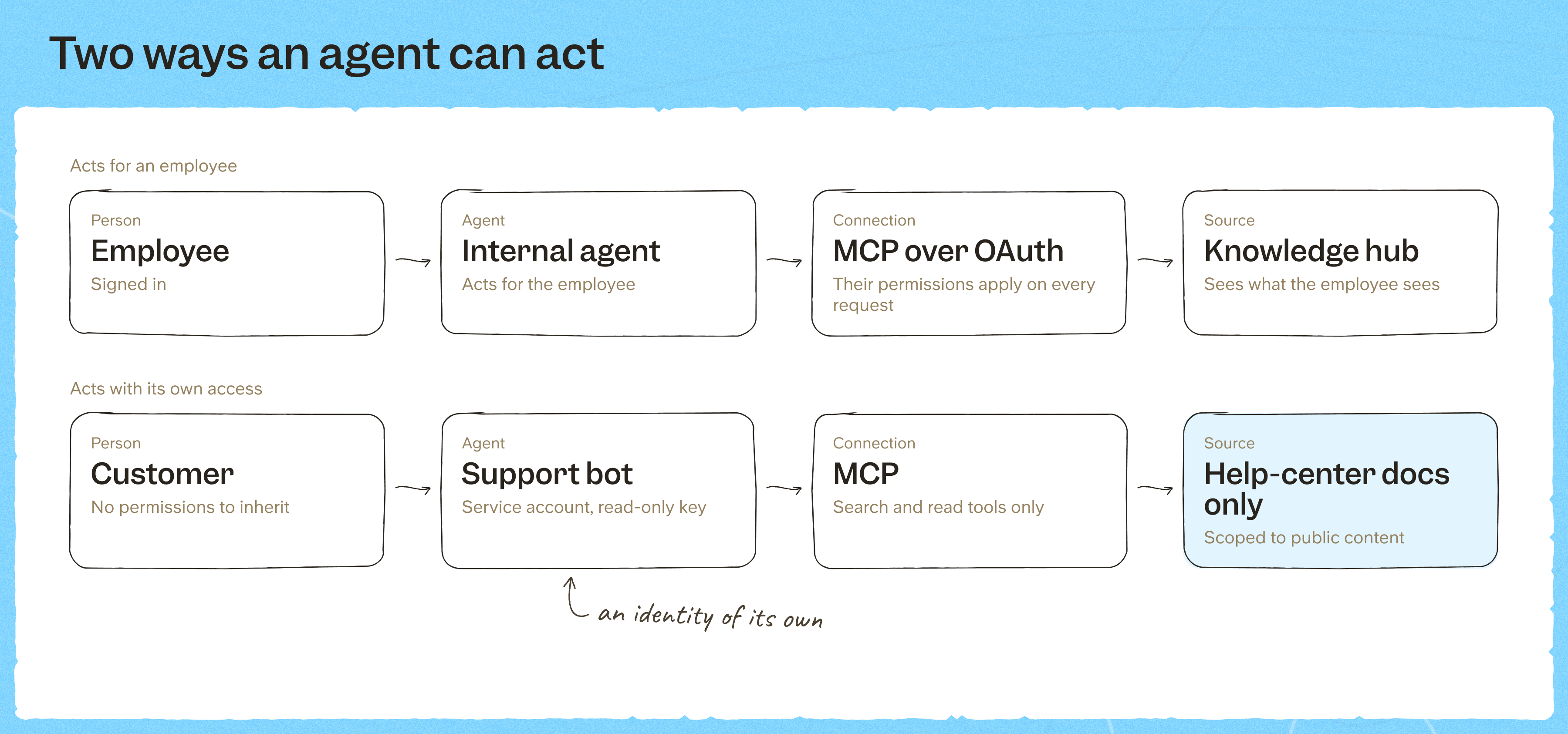
An AI agent either acts for a signed-in employee or acts as itself with access of its own. Internal assistants can borrow the asker's view; anything that serves customers or runs unattended needs its own identity.
Agents that act for an employee
Inheriting the asker's view is the right default for internal assistants. When someone asks Claude, ChatGPT or Cursor about company knowledge, the agent should see exactly what that person can open, and no more.
Problems start when an internal agent runs on a shared admin connection instead.
A contractor in a shared Slack channel asks the bot about salary bands. The bot can read the HR folder, so it answers with data the contractor could never open themselves. This is the confused deputy problem: an agent with broad rights acting for someone with fewer.
The same risk applies when an agent reaches third-party tools over MCP, such as Granola, Miro or Airtable.
The fix is to have each person connect their own account to those tools, so every call runs with the token of the person asking.
Agents with their own access
An agent that serves customers or runs on its own needs an identity that belongs to no one. It starts with zero access, gets sources granted one by one, keeps working when people leave and shows under its own name in logs.
Personal API keys can't do this job, because a key can never see less than its owner. So a bot running on an admin key gets admin reach.
A customer on your help center has no permissions to inherit, so whatever the agent can see is what they can see. This is why a customer-facing agent must run with its own identity, scoped to public content.
How to set the right access for each agent
List every agent and every source, then mark each pairing as none, read or act. Grant each agent the minimum its job needs and nothing by default. Least privilege only holds when it's written down per agent, in a form someone can review before launch.
A typical starting matrix for four kinds of agent:
| Agent | Identity | Help center | Product docs | CRM | HR docs | Finance data |
|---|---|---|---|---|---|---|
| Customer support bot | Service account | Read | None | None | None | None |
| Sales assistant | Acts for employee | Read | Read | Read | None | None |
| Department assistant (HR, IT, ops) | Acts for employee | Read | Read | None | Read (HR only) | None |
| Finance agent | Service account or acts for employee | None | None | None | None | Act, with human review |
No agent gets access a person in the same role wouldn't have. Chris, our CEO, designed Slite's permission layer so it "should only restrict rights."
When tasks need different levels of access, OWASP's guidance on excessive agency is to use multiple agents, each with the least privileges it needs, instead of one agent holding the union of all of them.
Read access and write access are separate decisions
A read-only scope should mean the agent only gets search and read tools. With no write tool exposed, there's nothing for a hidden instruction to trigger. Write access is its own decision, with its own review steps and autonomy levels.
A worked example (hypothetical)
Say your support bot needs the help center and nothing else. You give it its own identity, grant it the help center only, give it a read-only key and connect no other sources. If the key leaks, it only reaches the help center, and those docs were already public.
AI agent guardrails beyond permissions
Permissions stop an AI agent from seeing what's out of scope, but they don't stop it leaking what's in scope. For a customer-facing agent, scope is the real guardrail: if a doc is in scope, assume a determined customer can get the agent to quote it.
Instructions in the system prompt help, but they aren't access control. OWASP's Top 10 for LLM applications notes that system-prompt restrictions on what data to return "may not always be honored" and can be bypassed through prompt injection.
Filtering has to happen before retrieval. With permission aware search, a document outside the agent's access never reaches the model, so no prompt can pull it out.
Treat every third-party MCP tool's output as untrusted input, the same way you treat a customer message.
Agent actions should show under the agent's name, not a person's, so your document control trail can tell agent activity from human activity.
How to test an agent's access before launch
Run these checks on your own content, ideally live in the vendor demo:
- Log in as two different users and compare the answers to the same question, including results from connected sources like Google Drive.
- Give the bot its own identity, start it at zero access and grant one source.
- Ask for a restricted doc as an employee, as the agent's service account and as an anonymous customer, and confirm it stays hidden every time.
- Try a write with a read-only key and confirm the write tool isn't there.
- Hide an instruction in a test customer message and confirm nothing outside the scope comes back.
- Ask to see the raw MCP tool calls, and check that the audit log shows the agent by name.
- Revoke access in one step, for example by archiving the account so its keys stop working.
How to set up agent access in Slite
In Slite, agents that act for an employee connect to the Slite MCP over OAuth and see what the signed-in person sees.
For third-party tools like Granola, Miro or Airtable, an admin sets up each connection once for the workspace: the server, the OAuth app and which tools exist.
Each person then clicks "Connect my account" and signs in with their own account, no admin rights needed.
Slite's AI agent always calls those tools with the token of the person asking, so nobody gets results from the admin's account. Admins can manage connections but can't read content from someone's personal connection unless they're explicitly granted access.
That way the setup stays central while every call runs as the person asking, so there's no shared admin token to misuse.
Agents that need their own access get a service account: a non-human account that owns its own API keys and connects to the Slite MCP with them. Slite built service accounts so a bot never has to run on a person's key.
- It starts with access to nothing. You grant it specific channels or docs.
- Its key is read-only or read and write. A read-only key exposes only search and read tools, even where the account has writer access.
- Its effective access is what it's been granted, intersected with what its key allows.
- It can never be an admin, and its actions show under its own name in audit logs.
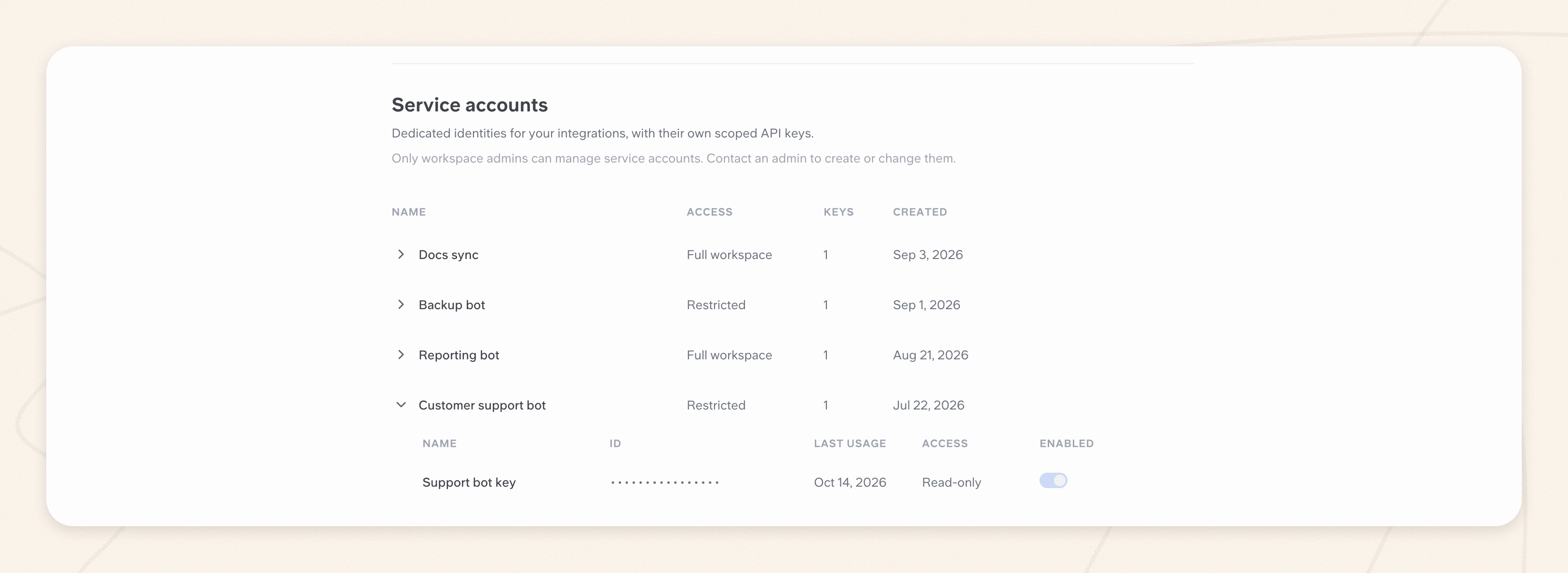
For the support bot from the example above, that means a service account with access to the help-center channel only and a read-only key.
For connected sources like Google Drive, Slack and Salesforce, Slite mirrors each source's permissions, so an agent acting for an employee only gets results from files that person can open there. For how retrieval itself works over MCP, see MCP vs RAG.
Final thoughts
Most of the risk is decided before launch, by whose access the agent runs on and how small its scope is. Start every agent from zero, widen only what its job needs, and fill in the matrix row for your next agent before it meets a customer.
If you'd like to run the test on your own content with a service account and the Slite MCP, book a demo and we'll walk through it with you.
FAQ
How do I stop a customer-facing AI agent from accessing financial data?
Keep finance sources out of its scope entirely. Connect it through a service account that can only read public content, so finance folders never show up in its search results, whatever a customer asks.
Can I set permissions per agent for MCP tools?
Yes. Each agent gets its own service account and key, which decide which sources it reaches and whether its MCP connection exposes write tools at all. Allowing or blocking individual tools one by one is usually done in the MCP client.
Should AI agents reuse human user permissions?
Only when the agent acts for one signed-in person, like an internal assistant connected over OAuth. Shared bots, automations and customer-facing agents need their own identity, or they end up answering with someone else's reach.
How do you set guardrails for AI agents?
Treat a small scope as the main guardrail, then add the rest: filter before retrieval, treat customer messages and third-party tool output as untrusted, require human review for writes, and log every action under the agent's name.